Back to blog
Back to Case Studies
How to Optimize Inventory Rebalancing
.png)

Inventory Rebalancing with Lumi
Inventory demand is rarely uniform across every region, store, or distribution center. Some locations accumulate excess stock while others are under-supplied. Inventory rebalancing helps teams identify where stock is misaligned and reallocate it before markdowns, write-offs, or isolated stockouts occur. In this guide, we walk through Lumi's approach to inventory rebalancing using natural language and AI-powered analysis.
Watch the Full Walkthrough
In this walkthrough, Liam from Lumi AI demonstrates how to identify localized excess inventory, locate absorbing sites with stronger demand, and size transfer opportunities in minutes.
What is Inventory Rebalancing?
Inventory rebalancing is the process of moving inventory from overstocked locations to locations with stronger expected demand. Teams use item-location analysis to quantify excess and match it with available absorptive capacity.
Inventory rebalancing helps teams:
- Reduce localized overstock before it turns into carrying cost or markdown risk.
- Improve in-stock performance in locations with higher demand.
- Deploy working capital more efficiently across the network.
- Make faster transfer decisions with consistent, data-backed rules.
All of these outcomes support the same goal: placing the right inventory in the right location at the right time.
Inventory Rebalancing with Lumi
Lumi makes inventory rebalancing analysios straightforward by translating natural languge questions into actionable operational analytics. Here is the step-by-step workflow.
1. Identify localized excess inventory
Start with a simple prompt asking for localized instances of excess inventory accumulation. Lumi retrieves the relevant context and applies your configured business logic.
.png)
In this example, excess inventory is defined as inventory greater than what would typically sell in six months, where six-month demand is estimated from average monthly sales over the last 12 months.
The output includes item-location pairs, current stock on hand, average monthly sales, and excess thresholds, making it easy to isolate where inventory is materially above expected demand.
2. Find locations that can absorb the excess
Next, ask Lumi whether other locations can absorb that excess inventory. Lumi identifies locations with stronger demand for the same products and returns a list of candidate destination sites.
.png)
This quickly turns diagnosis into action by surfacing transfer targets instead of only flagging exceptions.
3. Validate that transfers will not create new overstock
Before executing transfers, add a follow-up prompt to confirm that recommended absorbing locations will remain healthy after receiving inventory.
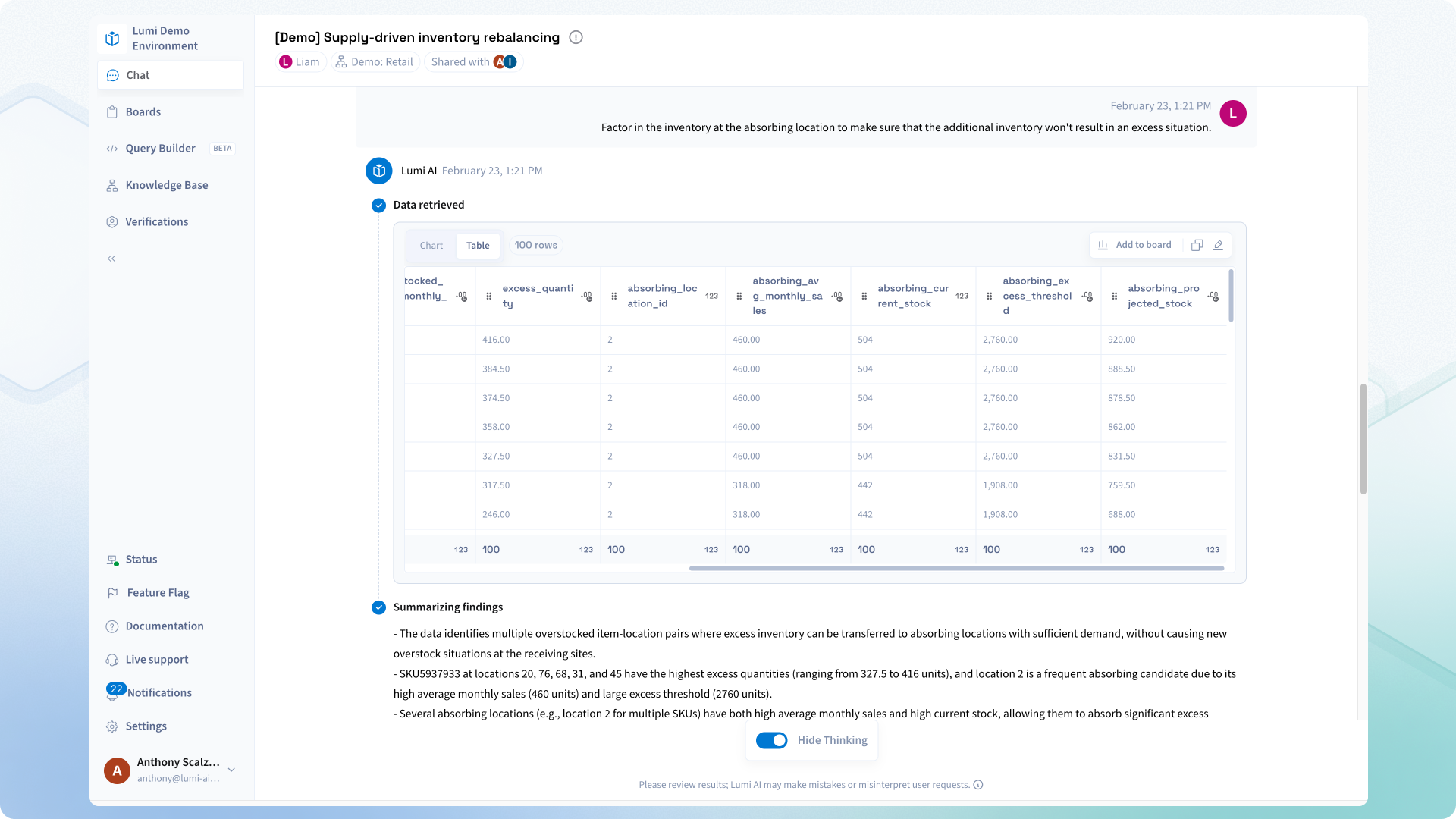
Lumi can return destination inventory context and stock projections, so teams can avoid shifting excess from one node to another.
4. Roll up to item-level opportunity sizing
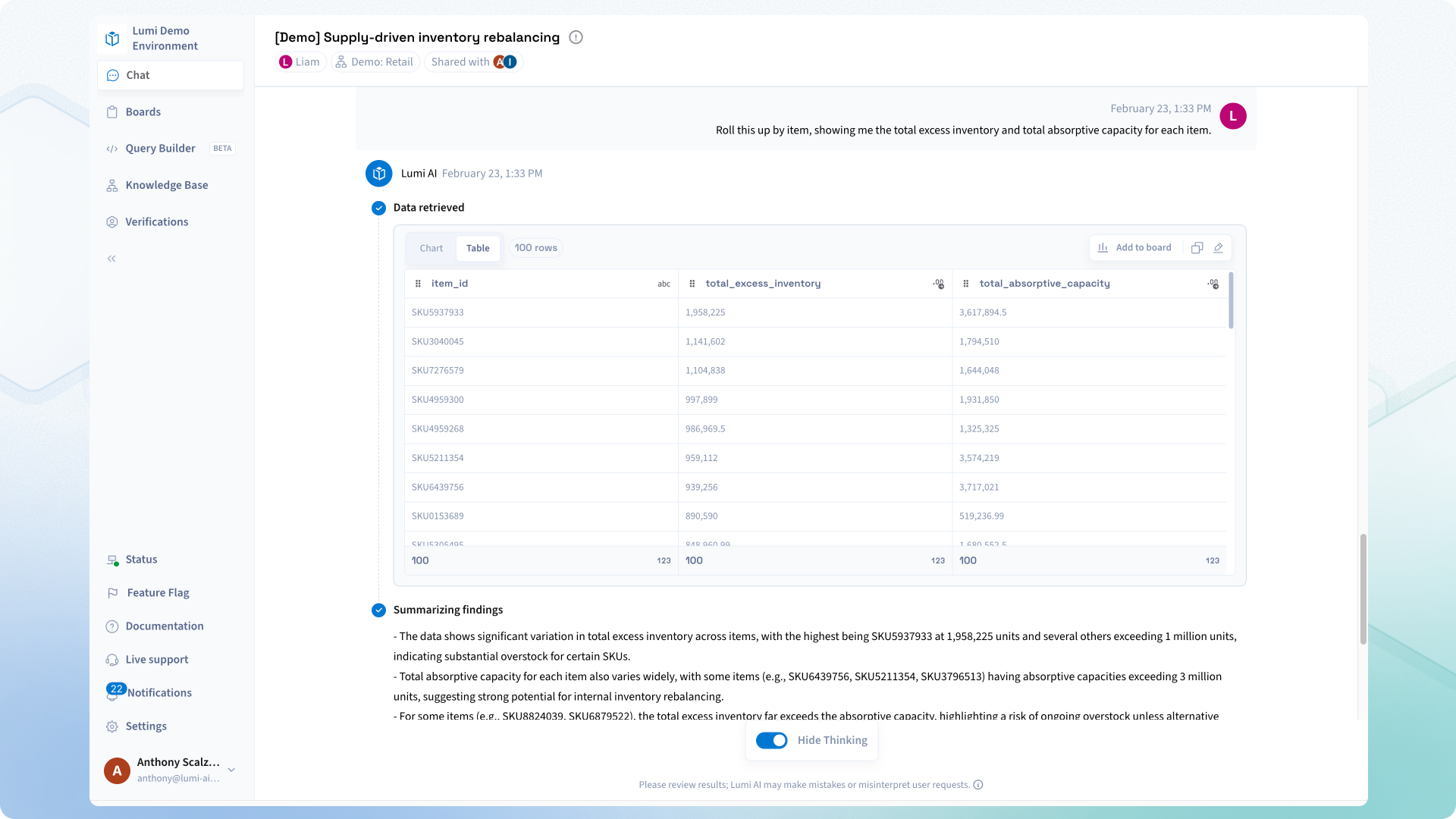
As a final step, ask Lumi to roll the output up to the item level. This provides a concise view of total excess inventory and total absorptive capacity by item, helping planners prioritize transfer actions and estimate impact.
Discover how Lumi AI can streamline your inventory rebalancing process with advanced AI-driven insights and automation. Book your demo today.
Why Inventory Rebalancing Matters
Localized overstock often hides inside aggregate metrics, while nearby demand gaps continue to drive missed sales. By combining natural-language analytics with consistent inventory logic, Lumi helps teams detect imbalances early, validate transfer feasibility, and operationalize rebalancing decisions quickly.
With one analysis thread, organizations can move from issue detection to actionable transfer planning in minutes.
Frequently Asked Questions
Q1: What data is required for inventory rebalancing in Lumi?
At minimum, teams need item-location inventory balances and historical sales or demand by item and location. Additional fields such as transfer constraints, lead times, and cost data can further improve decision quality.
Q2: How does Lumi define excess inventory?
Lumi applies the definition configured in your business context. In this walkthrough, excess inventory is stock above six months of expected demand, based on the last 12 months of average monthly sales.
Q3: Can this workflow be reused regularly?
Yes. Once validated, the analysis can be saved to a Lumi board and refreshed on demand so planners can monitor rebalancing opportunities continuously.
Q4: How is this different from a static dashboard?
Static dashboards show current state metrics, but they usually do not walk through dynamic follow-up logic. Lumi supports iterative questioning, automatic query generation, and contextual refinements that move teams from detection to decision.

Make Better, Faster Decisions.
.png)
.avif)
.avif)

Join Our Newsletter
Subscribe for the latest on self-service analytics, AI, and data-driven transformations.